For your web developer

Add a page to your website

This is ready to use copy for a page on your own website, telling guests about the digital guidebook that comes with their tour.

Copy it, paste it, publish it, then link to it from your booking confirmation email. About twenty minutes, most of which is your developer pasting.

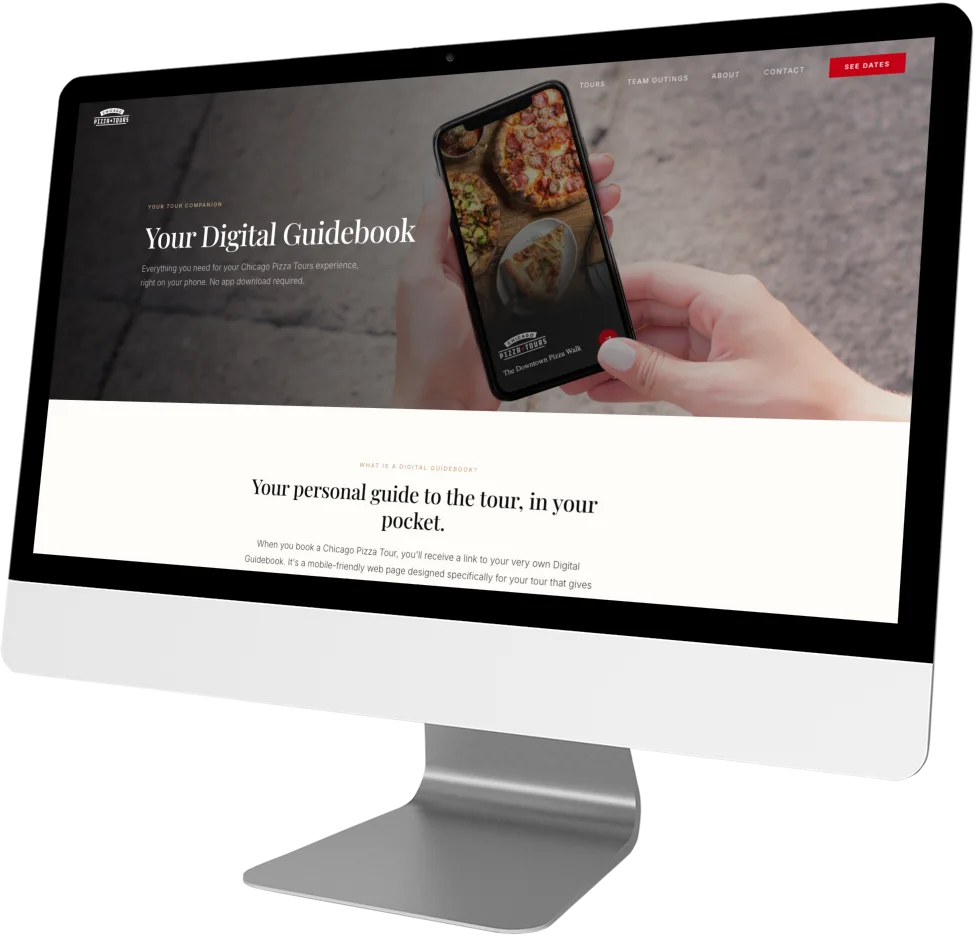
The digital guidebook page published on the Chicago Pizza Tours website, shown on a desktop screen

A real one. See the live page at Chicago Pizza Tours.

Step one

Copy and paste this

This is the minimum the page needs. Copy it, paste it, and you have a working page. Everything after that is optional and makes it better.

Developer: everything you need is in the block below, with the heading tags already in place. Paste it into a new page, change the two bracketed bits, and you are done.

Replace [Your Company] with the company name and [something local] with a real thing from one of the tours. Nothing else has to change for this to work.

COPY AND PASTE, STARTS HERE

PAGE TITLE (browser tab and search results)

Your Digital Guidebook | [Your Company]

META DESCRIPTION

Every [Your Company] tour comes with a digital guidebook: your meeting point, your guide, the stops, and where to eat after. No app to download.

PAGE CONTENT

<h1>

Everything you need for the day, on your phone

</h1>

When you book with [Your Company], you get a digital guidebook for your tour. It opens in your phone's browser, so there is nothing to download and nothing to set up. Your meeting point, your guide's name, every stop on the route, and our recommendations for afterwards are all in one place, and they stay there after the tour ends.

<h3>

Know where you are going

</h3>

The meeting point is the part people worry about. Your guidebook has the address, a map, and directions that open in whichever app you already use. If anything changes on the day, the guidebook changes with it.

<h3>

Meet your guide before you arrive

</h3>

You will see who is taking you out, what they know, and why they love this city. Turning up to meet a stranger is easier when they are not quite a stranger.

<h3>

Follow along as you go

</h3>

Every stop is in the guidebook, with the story behind it. If you want to remember the name of that place with the good [something local], it is there. You are not trying to photograph a sign in the rain.

<h3>

Keep the city after the tour

</h3>

The guidebook stays on your phone. Our favourite places to eat, the ones we send our own friends to, are in there for the rest of your trip.

<h3>

Nothing to download

</h3>

It is a web page, not an app. You will get the link when you book. Open it, and you are in.

<p>

We are proud to offer Digital Guidebooks, a community focused platform trusted by tour operators.

</p>

THE LINK, IN FULL

<a href="https://digitalguidebooks.com/?utm_source=[your-company]&utm_medium=referral&utm_campaign=guest_page">Digital Guidebooks</a>

Swap [your-company] for the company name, lower case with hyphens, so we can see which sites send people our way and thank the ones that do. Please leave it as a normal link rather than adding rel="nofollow".
COPY AND PASTE, ENDS HERE

Step two, when you have time

Five ways to make the page yours

The page above works as it is. These are what turn it from a page that exists into one that sells tours.

Scroll sideways for all five.

1

Say it the way you say it

Rewrite the paragraphs in your own voice, with your tour names and your city. Guests can tell the difference between writing meant for them and writing meant for anybody.

It matters for search too. If several operators publish the same paragraphs, none of those pages is the original and none of them ranks. In your own words, this page can rank for your city and your tours.

2

Put a picture of your guidebook at the top

A page about a thing should show the thing. An image of your own guidebook on a phone is the single biggest improvement you can make here.

Email hello@digitalguidebooks.com and ask for a mockup of your guidebook on an iPhone. We will make one and send it over.

3

Say what you actually put in yours

The generic version covers what every guidebook does. Yours probably does something specific: a playlist, the recipe, the bar you send people to afterwards, the history you cannot fit into the walking time.

Name those. They are the reason someone picks you.

4

Add your own FAQs

Use the questions guests actually email you. Do I need to download anything? What if my phone dies? Can I share it with the rest of my group? Will I still have it next year?

Answering those on the page removes the doubt that stops a booking, and it is the kind of content search engines like.

5

Link it from your confirmation email

This is the one that matters most. Add the link to the booking confirmation, framed as a complimentary upgrade to their experience rather than an instruction.

Guests book weeks ahead and then hear nothing until the day. This gives them something to look forward to, and it reaches everyone who has already booked.

For the developer

Questions that come up

Where should the page live?

A page of its own, at something like /digital-guidebook or /your-guidebook. Link to it from the main navigation and from each tour page. The links from your tour pages are what make it worth having.

Should this link to a real guidebook?

No. The guidebook is part of what guests paid for, and it holds recommendations the operator spent years collecting. This page describes it. It should not open it.

How many H1 tags?

One, the headline marked above. The five section headings are H3. If your theme already prints the page name as an H1, use H2 for the headline instead so there is only ever one.

Does the link to Digital Guidebooks have to stay?

It is not a requirement, and we would rather you kept it. If you do, please leave it as a normal link rather than adding rel="nofollow", and feel free to word it differently to suit the page. Varied wording across sites reads better than the same sentence everywhere.

Can I change the copy?

Please do. See the five points above. The only thing worth keeping intact is the heading structure.

Something is not working, who do I ask?

Email support@digitalguidebooks.com and a person will answer.