

JoeNotes The 20-second version
You can add your own pages to any guidebook now: a name, a title, your words, one image and one button. Use one to sell a private tour, run a corporate booking, or point guests at a local event.
Every plan gets the page. Separately, you now have one all access code that opens any of your guidebooks, for those times when a guide code will not work.
Oh my goodness, it is so much more powerful than it sounds. Or than it looks, in that photo. But hear me out.
Most of what I build starts as one operator asking for one thing. This release started as three requests that turned out to be the same request.
One operator wanted a page to sell private tours from inside the guidebook. Another wanted to run a corporate booking without the tipping page in it. And a hotel, which has no tour stops at all, wanted a guidebook anyway. Three features, queued separately, each with its own build.
Then it became obvious they were all the same page with different words on it: a title, some copy, a picture and a button. So rather than build three things, I built the blank one.
I've got a blank page, baby, and I'll write your corporate group's name
There is now an Add Page button sitting next to Add Stop. You give the page a name, a title, some text, one image and one button, and it behaves like every other page in your guidebook. It shows up in the guest menu, it sits in the swipe order, it translates into all seven languages, and it comes along when you duplicate a guidebook.
Nobody goes looking for a feature called "custom page", so here is what operators are actually doing with them:
- Selling a private tour to a group that just finished a public one, at the moment they are most likely to book another.
- Running a corporate group from a duplicated guidebook with your own welcome page and the tipping page switched off.
- Featuring something happening in town this week, which you can change the week after.
- Sending guests somewhere specific, whether that is your shop, your booking page, or a partner you actually like.
- Cross-selling, by pairing the page with links on the stops that surface through Local Places.
- Building a guidebook with no tour in it at all, which is what makes this work for a hotel or a venue.
Your pages are published the same way the rest of your content is. You can work on one over several sittings and guests keep seeing the last version you published, so nothing half-finished goes out while you are still thinking about it.
Three things to try this week
The page is blank on purpose, which is useful and also slightly paralysing. So here are three worth setting up, start to finish.
Run a corporate group
- Open the guidebook you want to base it on, and choose Make a Copy from its menu.
- Retitle the copy for the company, so the guests see their own name on it.
- Turn the Welcome page on and greet that group directly.
- Turn the Gratuity page off. A corporate booking has usually settled that in the contract, and asking twice is awkward.
- Add a page for anything specific to the day: the agenda, who to call, where the bus is waiting.
- Publish.
Your logo and colours are already on it. Those are set once for your account, not per guidebook.
Sell a private tour to the group standing in front of you
- Add a page and name it something a guest would actually tap, like "Book this for your group".
- Write the offer rather than the feature. What they get, roughly what it costs, how to start.
- Use one photograph of a real group on a real tour.
- Point the button at your booking page or enquiry form.
- Move the page near the end, so it lands after they have had a good time rather than before.
This is the one most likely to pay for itself. Guests are warmest in the last twenty minutes.
Feature what is happening in town
- Add a page named for the thing itself, like "This weekend in Nashville".
- Two or three sentences on why you would go. Your recommendation is the product here.
- Point the button at tickets, or the venue.
- Change the copy whenever it changes. Guests see the new version the next time you publish.
Works for a festival, a season, a partner venue, or anything you are tired of repeating out loud.
Every plan gets the page
A blank page with a button on it is, if you squint, the cross-sell feature that sits on a higher plan. I thought about gating it and decided against it, because gating the page works against the reason it exists. A hotel cannot use this product at all without it.
So the page itself is on every plan. What stays on the paid plans is the reporting: which page a guest tapped, and what it led to. A lower plan gets a working button. A higher plan learns what the button did.
Worth knowing: the clicks are recorded for everyone from today, whatever plan you are on. So if you upgrade in six months, the answer to "did that private tour page ever do anything" is already sitting there waiting, rather than starting from zero on the day you pay.
A code that works when the guide code will not
Shannon Largen at Walk Eat Nashville had built a guidebook for a private group she was running. On the day, a guest could not get in. The code was right. The app said it was not, and there was nothing the guide standing next to that guest could do about it.
That is the worst version of this product. Someone is standing in front of your guest, the tour is about to start, and the thing you handed them will not open.
You now have one all access code, set in Settings under Guest Access. It opens any guidebook in your account, and it needs no login, because the guide reading it out to a group does not have one. Give it to your guides. It is the answer to a gate that will not open, whatever the reason, and it means nobody has to stand there apologising for software.
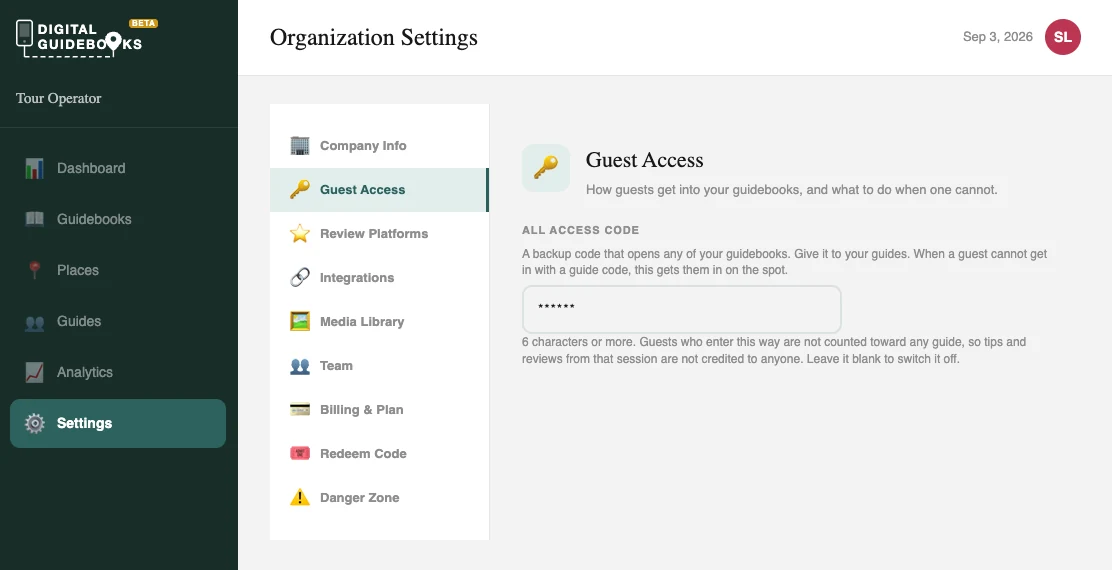
One thing to know before you hand it out. A guest who comes in this way has not told us which guide they had, so that session skips the gratuity and guide pages rather than crediting the wrong person. It gets everybody into the content, which is the emergency it exists for. It is not a replacement for guide codes on a normal day. Letting a guest pick their guide is the better answer to that, and it is on my list.
Thank you, Shannon. This one only shows up in a real room, and I would not have found it on my own.
Also worth knowing
Guests reading in another language were still hitting English in a few places. Fixed. If you have translation on, your guidebook is now translated the whole way through.
Your dashboard has a What's new panel. Releases like this one now show up where you actually work, instead of only here.
If something in your guidebook feels wrong, tell me. Half of this release exists because an operator said so.