

JoeNotes The 20-second version
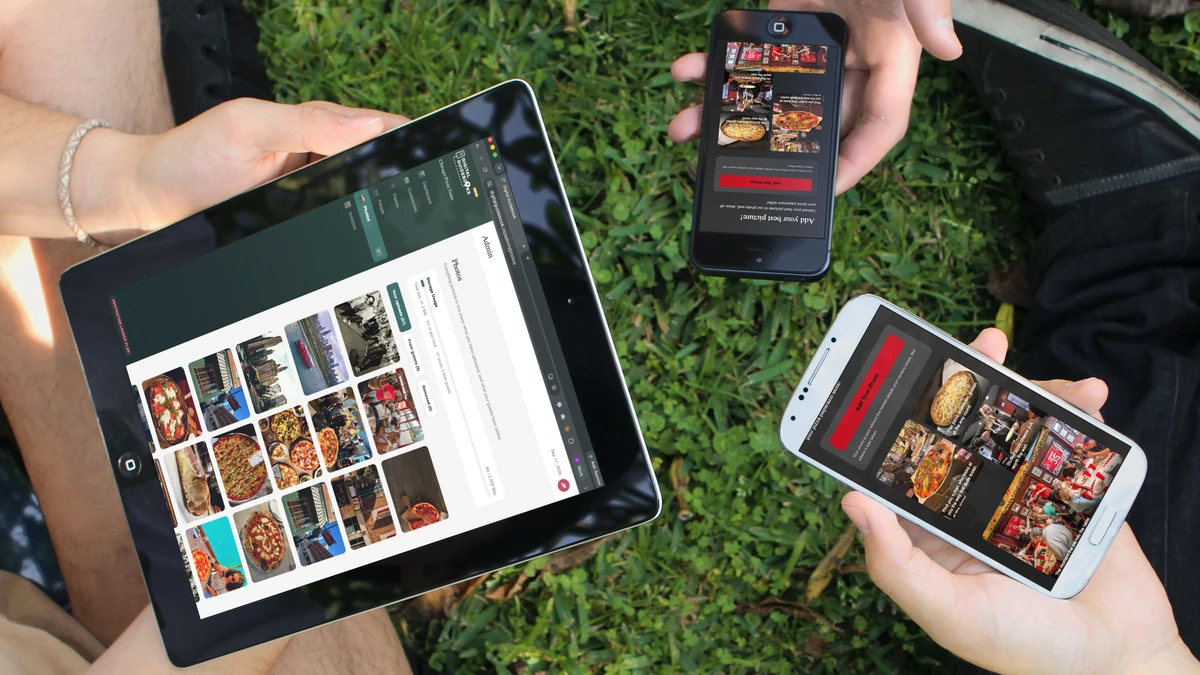
Your guests can now add photos from inside your guidebook. A photo goes up the moment it is sent, and you can take any of them down.
They can also say which stop it was taken at, so you end up with guest photos attached to each of your places, ready to send to the partner who hosted them.
One line of code puts that wall of photos on your own website.
You get one email a night, and only on the nights someone sent something.
None of this asks anything extra of your guides.
There is also a page of ready to use copy for your own website, all about what a digital guidebook is. Fill in your company name and hand it to whoever runs your site.
Photographs at the end of a tour are not an unsolved problem, and I am not going to pretend we spotted something nobody had noticed.
You already watch people work around it, every single day. Somebody hands the guide their phone and asks for one with the group in it. Two strangers who met ninety minutes ago stand on the pavement AirDropping a burst of photos to each other. Somebody says what is your number and texts four pictures that arrive squashed into mush. There is a family WhatsApp group that gets all of them and a guide who ends the day with a camera roll they keep meaning to do something with.
It is a real enough problem that there are whole companies built on it. Fotaflo and Picsaurus both make photo products for tour operators, and both do things this does not: a photographer's workflow, staff capturing and delivering shots to every guest. If that is the job you are hiring for, they are the people who do it, and I would rather say so than pretend otherwise. I have written up how the three of us actually differ if you are weighing them.
What we built is narrower. It starts from the guidebook your guests already have open, and the photographs it collects are theirs rather than yours. Your guidebook now has a photo wall. Guests put their own pictures on it, everyone on that tour sees them, and you keep them.
I did not come up with this one. Several of you have asked for it, in office hours and in passing on calls, for long enough that it stopped being a feature request and started being an obvious hole in the product. Mike at American Ghost Walks made the case for it hardest and kept making it, including the part I had wrong, which is below.
The question we kept circling was this: how do we get the photos off a tour at no extra work to your guides. Anything that starts with "and then the guide collects everybody's pictures" dies on contact with a real Saturday afternoon.
So the guest does all of it. They open the guidebook they already have, the page explains itself in whichever of the seven languages they read, and they understand what is being asked without anybody standing there asking it. Nothing changes about how your guides run a tour.
Which does run on the honor system at the moment. Nothing checks that a photo on your wall was taken on your tour, and I would rather start there and watch what actually happens than build a policing system for a problem you may never have. If it turns out to need more, it will get more.
It goes up while they are still standing there
I built this the sensible way first. Photos would arrive, you would approve them, then they would appear. Every photo product works like that and it is obviously correct.
Then I watched what it would actually feel like, and Mike pushed back on it, and I threw it out.
Somebody sends you a photograph of their friend laughing at a stop you chose, and the guidebook says thanks, we will let you know. They are standing on a pavement with their phone in their hand. By the time you approve it they are on a train home and the moment is gone.
So photos go live the second they are sent. The guest sees their own photograph on the wall while they are still standing in the place they took it. You get an email, and if something should not be there you take it down. That order matters more than it sounds.
One wall, unless you want more than one
By default every guidebook in your account shows the same wall. A tour you are running for the very first time this morning opens with photos already on it, from everything else you run, which is the difference between a page that looks alive and a page that looks broken.
If one of your tours has nothing to do with the rest, open its Photo Wall page and turn on Show only photos from this guidebook. That tour gets its own wall and stops borrowing from the others.
That is the whole of it. One toggle, and only if you want it. There is nothing to set up before a tour and nothing to close afterwards.
Guests can tell you where they took it
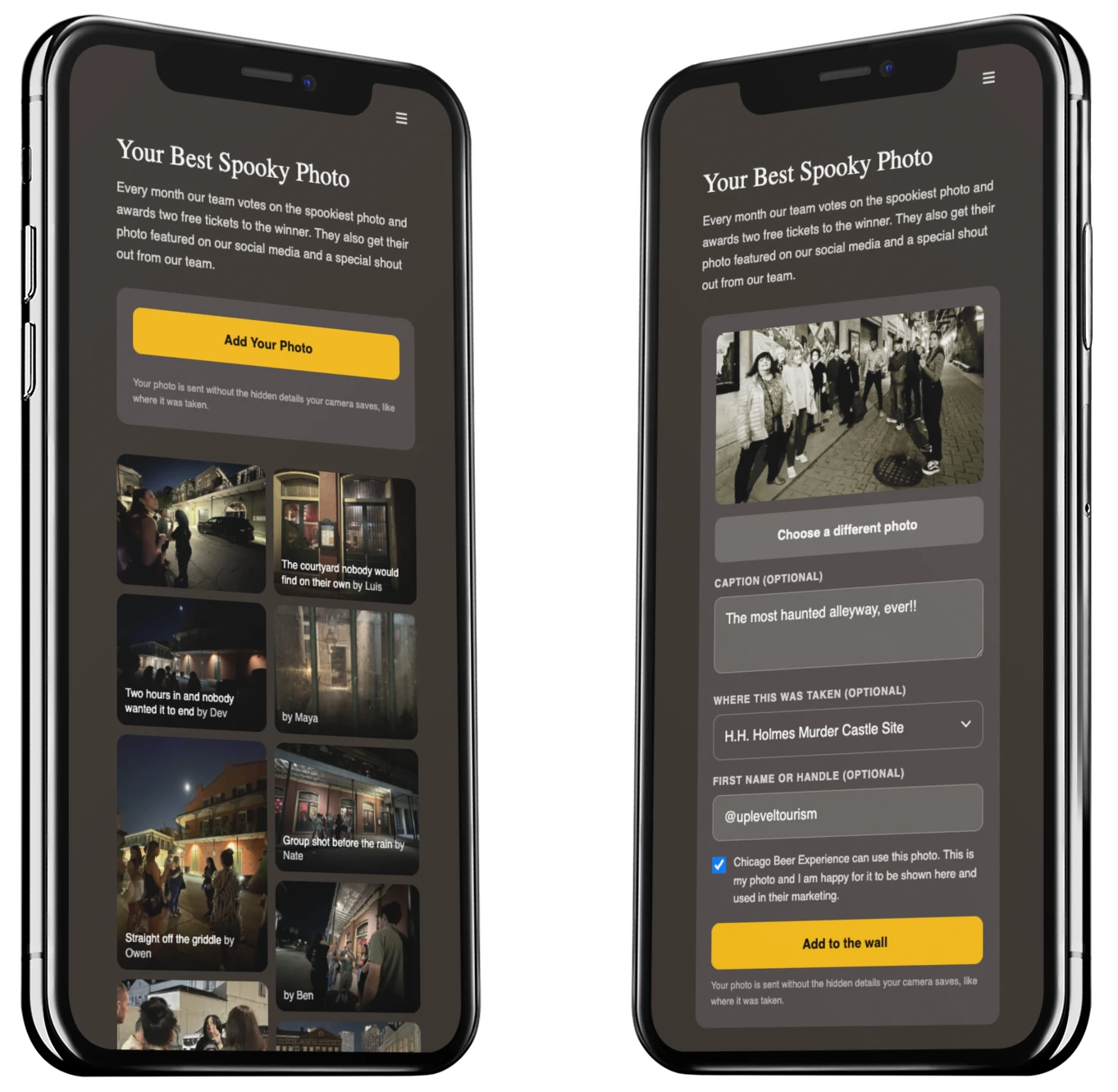
New in this release, and it is one dropdown, so please do not skip past it. You can see it on the right hand phone up there.
When a guest sends a photo they can say which stop it was taken at. The list is your stops, in your order, with a Not sure at the top and a Somewhere else at the bottom. It defaults to Not sure, which means ignoring it entirely is a perfectly valid way to send a photo. Nobody loses their picture because a dropdown got in the way.
What you get is a slow accumulation of something you cannot buy: which of your places people actually point a camera at. Not which stop you think is the best one. Which stop got photographed on a Tuesday in September by somebody who had never been there before.
I have plans for that, and they involve the venues themselves, but the first step is simply collecting it honestly.
Put the wall on your own website
This is the part I would do first if I were you.
Paste one line into your website and the photo wall appears there, sideways scrolling, at your page's own width. It is a script rather than a frame, so it sits in your layout properly and your stylesheet cannot break it.
<script src="https://digitalguidebook.co/embed/wall.js" data-org="your-slug" async></script>
Your slug and the exact snippet are on the Photos page in your account, ready to copy. Send it to whoever looks after your website and you are done.
The photographs on your tour pages stop being the same five you shot in 2019, and they start being whoever came last week.
Getting the first photos up
- Open a guidebook and turn the Photo Wall page on.
- Write a couple of lines telling guests why they would want to give you their photos. Best photo of the month, and two free tickets for whoever wins it, does more work than any wording I can give you.
- Give it two tours, then copy the snippet from the Photos page onto your website.
The only part that really matters is the second one. A wall that says "add your photo" gets a handful. A wall that gives somebody a reason fills up.
One email a night, on the nights there is something to see
You can switch on a nightly digest from the Photos page. It arrives around eight in the evening, your time, and only on days when somebody actually sent something.
No photos that day means no email that day. I am not going to teach you to ignore mail from me.
The guidebook never interrupts your guest
Worth saying out loud, because it is a decision rather than something we have not got to yet. Your guests get no notifications from a guidebook. Not when a photo goes up, not when somebody comments, not ever. There is no notification anywhere in the product and there is not going to be one.
A guidebook is meant to be there the moment somebody reaches for it and completely out of the way when they do not. They paid for the tour, not for the phone. Anything that buzzes in their pocket mid-experience is competing with the thing you spent all morning giving them, and I would rather lose the photo than win the interruption.
The wall fills up because somebody opened their guidebook and found a reason to add to it. That is the only prompt in the system, and it is the guest's own curiosity rather than a push.
Taking one down
Hide any photo and it disappears from the guidebook and from your website on the next load. You get twelve seconds to undo it, because I have fat fingers too. Hidden photos sit in a Removed tab where you can look at them again, and they are deleted for good after thirty days.
Nothing waits for you. But nothing is stuck there either.
Whose photograph it is
A guest has to tick a box saying you can use their photo. That one is not optional, because without it what you have is decoration rather than something you can put on a tour page or in an advert.
The box also covers the other people in the shot, which matters more than it sounds, given most tour photographs are of the rest of the group.
Their first name is a separate, optional field, and it is a preference rather than a gate. If they give it, the credit shows on the photo. If they do not, the photo still goes up. Credit should never be the reason a good picture does not exist.
Their email address comes along too, and this is the part worth knowing about. The upload form never asks for it. It is the address they already typed on the way into the guidebook, and it gets attached to the photograph quietly. Open any photo full size in your admin and it is sitting there next to the caption.
So when somebody sends you the shot of the year, you can write back to the person who took it. Ask if you can put it on the front of your website, or in an advert, or tell them it won the month. That conversation is a great deal easier to have when you are not starting with "does anyone know who took this".
Two caveats. It is only there if they left an address on the way in, so expect a healthy share of photos to have a name and no email, and it never leaves your account. It is not on the wall, it is not in the website embed, and a guest's browser is not permitted to read that column at all. The consent trail and the email are yours.
A page to send to your web team
While I am here, something that has been sitting on this site unannounced for a couple of weeks.
There is a page of ready to use copy for a page on your own website, all about what a digital guidebook is and what your guests get from one. You fill in your company name, hand the whole thing to whoever runs your site, and it is done without you writing a word of it.
Two reasons it earns its place. Someone who has booked, or is still deciding, can find out what the guidebook actually is rather than guessing. And when you are sitting across from a corporate booking or a school trip, you have somewhere to send them that shows the tool you run your tours with, which is usually the part that makes you memorable in a pitch.

It pairs with the photo wall better than I expected. One line of code and one page of copy and your guidebook has a proper home on your own website instead of only existing on the day of the tour.
Also worth knowing
Photos do not leave your guests' location behind. The hidden data a camera writes into a file, including where it was taken, is stripped in the guest's browser before the photo is ever sent. The full size original never leaves their phone either.
This one exists because a handful of you kept asking for it and one of you would not let it drop. That is how most of what I build starts. If your guests are photographing something you have not thought about, tell me. That is usually the next feature.